Restore-test your
Proxmox backups.
CertiStack restores a VM from Proxmox Backup Server into an isolated sandbox on Proxmox VE, boots it, checks that its services answer, removes the sandbox and checks that nothing is left. Every run writes a JSON report with its cleanup record. Your backups are mapped read-only, and the sandbox has no gateway and no uplink.
Used by the Clift Cloud team and its clients. Tested with more than 10,000 VM restore tests of 471 different VMs, Windows Server 2012 to 2025, Active Directory, SQL Server and nine Linux distributions, up to 100 VMs in one run; the exact v0.1.4 binary passed the full release set; over 7,000 automated tests; more than 3.6 million fuzzed inputs; fault injection with corrupt and impossible backups and killed runs (what was tested, on which build). A run adds a temporary SDN zone and its SSH key is root on the node: what it changes on your node.
curl -fsSL https://certistack.dev/install.sh | bash
Run it on a small Linux VM, not the Proxmox VE host. It checks the release's signature and checksums
before it installs anything, then certistack setup takes it from there.
Read the script.
$ certistack report show --keyring demo-trusted-signers.pub sample-pass.json
…
Outcome:       PASS
Plan:          recovery-pve-demo-01 "Recovery check of 1 VM(s) on pve-demo-01"
Proxmox:       PVE 9.2.2, PBS 4.2.0, proxmox-backup-client 4.2.0 (tested)
Validation:    full_integrity: every mapped disk image was read back and checksummed

RTO:           5m 43s (342.95 s); no objective set

  VM 9100 "cs-rocky-web"  PASS
    Restored from:     source VM 100, snapshot vm/100/2026-10-05T13:32:03Z
    Network recovery:  ifcfg, sandbox address 192.0.2.10, 3m 34s of offline preparation
    Integrity:         scsi0 verified, sha256 7f59c0196f93…
    Probes (1):
      PASS http http://192.0.2.10:80/  (from the worker host over the sandbox network, 33.1 s, 1 attempt)

Teardown:
  cleanup verified (at 2026-10-05T14:02:59Z)
  sandbox VM destroyed: yes; 1 overlay disk(s) removed; 1 loop device(s) unmapped
  sandbox network: removed: zone csZone1, VNet csVnet1
An excerpt of a real report from a test run on a demo node, written by an earlier build (v0.1.0).
To run the command yourself, download sample-pass.json and demo-trusted-signers.pub from the
verify page. The whole report, and how to verify it.
How CertiStack Validates Recovery
Read-only mapping and an isolated VNet with no gateway, SNAT or uplink keep the test off your production network. The report records each step and the cleanup.
01. Read-Only PBS Mapping
CertiStack maps the selected Proxmox Backup Server drive archives with read-only credentials. The mapped source remains immutable while the worker prepares the disposable recovery environment.
- ✓ Read-Only Source: Guest writes never target the mapped PBS backup.
- ✓ Integrity Evidence: In the default
full_integritymode a run reads every byte of each mapped disk and records its SHA-256 in the report. - ✓ On-Demand Mapping: PBS blocks are fetched as mapping, verification, or boot reads them.
"source_snapshot": "vm/100/2026-10-05T13:32:03Z",
"source_crypt_mode": "none",
"source_manifest_reference": "drive-scsi0.img.fidx",
"integrity_status": "verified",
"pbs_verify_status": "full mapped image read
  (12884901888 bytes; the size the snapshot's
  manifest records); SHA-256 7f59c0196f93…"
02. Read-Only Mapping & Temporary Storage
CertiStack maps PBS drive archives read-only and boots from disposable copy-on-write (COW) overlays. When cache conditions require it, the default copy-before-boot policy creates temporary local disk copies; neither path writes to the source backup.
- ✓ COW Overlays: Guest writes are contained in disposable scratch storage.
- ✓ Copy When Needed: The plan records when cache pressure requires a temporary full-disk copy.
- ✓ Capacity Guardrails: A run waits while the node would go above 85 % of its RAM or its I/O-wait limit, and needs 5 GiB free on the overlay storage.
"pbs_mapping_sec": 0.219084759,
"overlay_creation_sec": 0.118788744,
…
"overlay_files_removed": [
  "certistack-delta-vm9100-scsi0-1791208629162945811-0.qcow2"
],
"loop_devices_unmapped": [ "/dev/loop0" ]
03. Isolated SDN Sandbox Boot
Test workloads boot on an isolated Proxmox SDN VNet with no gateway, SNAT, or physical uplink. The worker adds a run-scoped nftables policy on the node as a second layer.
- ✓ No Routed Egress: Sandbox subnets omit a gateway and no SNAT or physical uplink is configured.
- ✓ Sandbox Addressing: By default the restored guest gets one isolated address and no gateway, default route, or DNS setting;
preserveleaves the backup's own settings untouched. - ✓ Defense in Depth: Run-scoped forwarding and host-input containment supplement the SDN boundary.
"network_recovery_strategy": "ifcfg",
"network_recovery_address": "192.0.2.10",
…
"source_interface": "csVnet1",
"source_address": "192.0.2.1",
…
"sdn_provisioning": "ephemeral",
"sdn_vnet_removed": "csVnet1",
"sdn_zone_removed": "csZone1"
04. Synthetic Health & State Probing
A green hypervisor indicator does not prove a recovered workload is useful. CertiStack runs configured, deterministic checks such as TCP, HTTP(S), DNS, LDAP, SQL Server, SMB, and constrained QEMU Guest Agent checks from the isolated recovery environment.
- ✓ Wire Probes: Test declared TCP, HTTP(S), DNS, LDAP, SQL Server (TDS), and SMB service behavior across the sandbox network.
- ✓ HTTP/TLS Checks: Assert the configured response status; HTTPS always verifies the certificate chain and the server name.
- ✓ Guest-Agent Checks: Run only constrained QGA requests declared by the plan.
"type": "http",
"target": "http://192.0.2.10:80/",
"description": "nginx answers 200 on the sandbox address",
"origin": "worker_host",
"source_interface": "csVnet1",
"attempts": 1,
"passed": true,
"detail": "HTTP 200 OK (200 OK) in 33.118674869s"
05. Run Report & Clean Teardown
Upon probe completion, CertiStack writes a report of the run as canonical JSON and records cleanup evidence. It tears down owned temporary resources; if cleanup cannot be proven, recovery state is retained and the run reports that condition rather than claiming success.
- ✓ Report of Each Run: The Community Edition writes the report unsigned; read it with
certistack report show. A run that fails before it reaches the node (an SSH failure, say) writes none. - ✓ Cleanup Evidence: The report records whether every resource the run made was removed; a run killed midway is finished by
recoveror the next run. - ✓ Signed Attestations (Enterprise Edition): The Enterprise Edition signs the report in its
certistackdservice, with an Ed25519 key kept in a root-only file on the node that runs it. Anyone can check the signature withcertistack verify-reportor the verifier in the browser, without a license.
"vm_stopped_and_destroyed": true,
"orphan_sweep_clean": true,
"all_cleaned": true,
"journal_recovery_verified": true,
"verified_at": "2026-10-05T14:02:59Z"
…
"all_passed": true,
"signer_fingerprint": "SHA256:1550c001e2142f2f…",
"signature": "d72df95cd0dcae19921c648e…"PBS Backup Verify vs. CertiStack Execution
Proxmox Backup Server provides exceptional backup verification at rest, but a healthy chunk hash does not prove your guest operating system or production application will boot and recover.
| Validation Capability | PBS Backup Verify (At Rest) | CertiStack Engine (In Sandbox) |
|---|---|---|
| Verification Scope | Read-only SHA-256 chunk checks at rest | Live boot in an isolated sandbox (no gateway, SNAT, or uplink) |
| OS & Kernel Driver Health | Not checked: verify reads chunks and boots nothing | Boots the guest and confirms it is running over QMP; optional guest-agent service checks |
| Filesystem & Database Recovery | Not checked: nothing boots, so no recovery runs | Boots the guest so its own filesystem and database recovery runs, then probes the service |
| Application Layer Health | No service port or API validation | Synthetic TCP, HTTP, DNS, LDAP, SQL Server, and SMB probes |
| Data Read & Storage Overhead | Reads and checks each chunk of the snapshots it verifies | Reads every byte of each mapped disk (default full_integrity) and boots from disposable COW overlays; never writes to the backup |
| Network & Routing Isolation | N/A (offline backup store check) | Temporary SDN VNet with no gateway, SNAT, or uplink |
| Record of Each Test | A verify state per snapshot and a task log | Portable JSON report of each run with cleanup evidence; the Enterprise Edition adds Ed25519-signed attestations and HTML/PDF auditor binders |
Read and verify a real report
This report was written by an earlier CertiStack build, v0.1.0 (commit 640f0c92e656), during a test run of a demonstration Proxmox VE and Backup Server.
It is signed with a throwaway demo key, the way the Enterprise Edition signs a report.
A Community run writes the same report without the signature members at the end
(public_key, signer_fingerprint, signature),
and certistack report show reads it.
It is real output, not a mock-up, and it is not a production report or a certification: a report documents one run.
Download it from the verify page and check it yourself; the verifier is open to everyone.
{
  "report_schema_version": "1.7",
  "report_id": "d3f589f5-c499-4181-a804-29da944b7fa1",
  "run_id": "run-6e1de311-cc50-4dd2-b263-79a1c78a557d",
  "timestamp": "2026-10-05T14:02:57Z",
  "plan_id": "recovery-pve-demo-01",
  "plan_name": "Recovery check of 1 VM(s) on pve-demo-01",
  "plan_sha256": "a1e99521b091cc111675cd38b30567b19212aa6f682a9de87bee3e4417ae5e67",
  "validated_plan_sha256": "cc91ba0731b59bf51182609511598be8e2771c0fbc7d3d4c10d1945ac3651434",
  "resolved_plan_sha256": "614001f5cc1331b52b73f82f70322649275a8bb23781d261c80c414016d92b87",
  "plan_digest_format": "worker-plan-yaml-v1",
  "pbs_fingerprint": "6d:cf:53:22:78:8a:e5:47:74:fc:95:44:94:8b:c4:d8:dc:a8:65:5b:1f:97:04:87:e2:f8:dd:85:0c:69:5f:6f",
  "pbs_namespace": "walkthrough",
  "validation_mode": "full_integrity",
  "node_fqdn": "pve-demo-01",
  "engine_version": "v0.1.0",
  "git_commit": "640f0c92e656",
  "build_date": "2026-10-04T11:46:58Z",
  "pve_version": "9.2.2",
  "pbs_version": "4.2.0",
  "pbs_client_version": "4.2.0",
  "version_support": "tested",
  "worker_sha256": "b04ab5ac118b2d0b210ff340b23f1a2d160a374d79acdd3287f5f7f86fdb8366",
  "frameworks": [
    "SOC2"
  ],
  "retention_days": 90,
  "vm_records": [
    {
      "vmid": 9100,
      "source_vmid": 100,
      "name": "cs-rocky-web",
      "boot_duration": 3657424213,
      "boot_duration_seconds": 3.657424213,
      "source_snapshot": "vm/100/2026-10-05T13:32:03Z",
      "source_crypt_mode": "none",
      "source_consistency": "quiesced",
      "source_consistency_detail": "the guest agent froze the file systems for the snapshot",
      "source_drive": "drive-scsi0",
      "source_manifest_reference": "drive-scsi0.img.fidx",
      "source_image_digest": "7f59c0196f93550731835832470b516a6f0662f6b7b90d3e42666c359db62be5",
      "source_disks": [
        {
          "slot": "scsi0",
          "archive": "drive-scsi0",
          "manifest_reference": "drive-scsi0.img.fidx",
          "integrity_status": "verified",
          "image_digest": "7f59c0196f93550731835832470b516a6f0662f6b7b90d3e42666c359db62be5"
        }
      ],
      "pbs_verify_status": "full mapped image read (12884901888 bytes; the size the snapshot's manifest records); SHA-256 7f59c0196f93550731835832470b516a6f0662f6b7b90d3e42666c359db62be5",
      "network_recovery_strategy": "ifcfg",
      "network_recovery_address": "192.0.2.10",
      "network_recovery_seconds": 213.698976461,
      "network_recovery_files": [
        "/etc/sysconfig/network-scripts/ifcfg-eth0",
        "/etc/systemd/network/00-certistack-recovery.link"
      ],
      "probe_results": [
        {
          "type": "http",
          "target": "http://192.0.2.10:80/",
          "description": "nginx answers 200 on the sandbox address",
          "origin": "worker_host",
          "source_interface": "csVnet1",
          "source_address": "192.0.2.1",
          "timeout_sec": 300,
          "attempts": 1,
          "passed": true,
          "duration": 33118674869,
          "detail": "HTTP 200 OK (200 OK) in 33.118674869s"
        }
      ],
      "verification_status": "verified",
      "restored_hardware": {
        "from_backup_config": true,
        "cores": 1,
        "sockets": 1,
        "memory_mb": 1024,
        "cpu": "host",
        "cpu_weight": 50,
        "machine": "q35",
        "scsihw": "virtio-scsi-single",
        "ostype": "l26",
        "nic_model": "virtio",
        "mac": "BC:24:11:9C:94:8B",
        "running_machine": "pc-q35-11.0+pve0",
        "smbios_uuid": "5cfc3bf7-a47d-40de-a306-76c9b139f911",
        "empty_cdroms": [
          "scsi1"
        ],
        "boot_disk": "scsi0",
        "boot_order": [
          "scsi0"
        ]
      },
      "all_passed": true
    }
  ],
  "phase_timings": {
    "admission_check_sec": 0.501762837,
    "sdn_provisioning_sec": 4.4360046539999995,
    "pbs_mapping_sec": 0.219084759,
    "overlay_creation_sec": 0.118788744,
    "cow_guest_network_recovery_sec": 213.698976461,
    "vm_registration_sec": 1.138575331,
    "vm_start_sec": 3.075476924,
    "qmp_running_wait_sec": 0.50507549,
    "integrity_verification_sec": 84.315576099,
    "startup_grace_period_sec": 0,
    "probes_execution_sec": 33.119525027,
    "teardown_sec": 10.292224012,
    "total_rto_sec": 342.945584747
  },
  "teardown_evidence": {
    "vm_stopped_and_destroyed": true,
    "overlay_files_removed": [
      "certistack-delta-vm9100-scsi0-1791208629162945811-0.qcow2"
    ],
    "loop_devices_unmapped": [
      "/dev/loop0"
    ],
    "sdn_provisioning": "ephemeral",
    "sdn_vnet_removed": "csVnet1",
    "sdn_zone_removed": "csZone1",
    "sdn_cluster_reloaded": true,
    "orphan_sweep_clean": true,
    "all_cleaned": true,
    "journal_recovery_verified": true,
    "verified_at": "2026-10-05T14:02:59Z"
  },
  "rto_seconds": 342.945584747,
  "admission": {
    "max_host_ram_percent": 85,
    "max_host_iowait_percent": 12,
    "defer_retry_interval_sec": 30,
    "max_defer_retries": 10,
    "recovery_reservation_mib": 1280,
    "recovery_reservation_vms": 1,
    "recovery_reservation_tier": 1,
    "evaluation": {
      "checks": 1,
      "decision": "granted",
      "host_total_mib": 32094.3828125,
      "host_available_mib": 28672.98828125,
      "host_ram_percent": 10.660257185776036,
      "host_iowait_percent": 0,
      "projected_ram_percent": 14.648652253935596
    }
  },
  "all_passed": true,
  "public_key": "8f4e812dfada7f6e1765926a8c7d84ec930a15ffbd48f77c29b9348206d2d888",
  "signer_fingerprint": "SHA256:1550c001e2142f2f0d11d8d741ced1be507bee08a1c2f1fbf9fab79cded39fd3",
  "signature": "d72df95cd0dcae19921c648ed5a0ddb654cedda0c0be3ce3a403aa4ec7876cf1fb169b211cc682ae824b31a1eea4b54f19314e2b69b2e91386ef27391664cf0c"
}
$ certistack report show --keyring demo-trusted-signers.pub sample-pass.json
CertiStack report d3f589f5-c499-4181-a804-29da944b7fa1
Signature: VALID, by a trusted signer (Key-1)
key 8f4e812dfada7f6e1765926a8c7d84ec930a15ffbd48f77c29b9348206d2d888
fingerprint SHA256:1550c001e2142f2f0d11d8d741ced1be507bee08a1c2f1fbf9fab79cded39fd3
trust source keyring:demo-trusted-signers.pub
signature timestamp: none
Acceptance: ACCEPTED as pass evidence (internal consistency only, not bound to your plan, node or build: add verify-report --expect-* to bind it)
Outcome: PASS
Plan: recovery-pve-demo-01 "Recovery check of 1 VM(s) on pve-demo-01"
Node: pve-demo-01
When: 2026-10-05T14:02:57Z (run-6e1de311-cc50-4dd2-b263-79a1c78a557d)
Engine: v0.1.0, commit 640f0c92e656, built 2026-10-04T11:46:58Z
Proxmox: PVE 9.2.2, PBS 4.2.0, proxmox-backup-client 4.2.0 (tested)
Validation: full_integrity: every mapped disk image was read back and checksummed
Frameworks: SOC2 (labels, not a certification; retention 90 days)
Schema: 1.7
RTO: 5m 43s (342.95 s); no objective set
Where the time went:
Host admission 0.50 s
SDN sandbox setup 4.4 s
PBS image mapping 0.22 s
Overlay creation 0.12 s
Guest network preparation 3m 34s
Image integrity scan 1m 24s
VM registration 1.1 s
VM start and boot 3.1 s
QMP running wait 0.51 s
Probes 33.1 s
Teardown (after the RTO) 10.3 s
Total (the RTO) 5m 43s
Admission: limits RAM 85.0%, I/O wait 12.0%; reserved 1280 MiB for 1 VM(s); granted
VMs (1):
VM 9100 "cs-rocky-web" PASS
Restored from: source VM 100, snapshot vm/100/2026-10-05T13:32:03Z
Backup: crypt mode none; quiesced (the guest agent froze the file systems for the snapshot)
Network recovery: ifcfg, sandbox address 192.0.2.10, 3m 34s of offline preparation
Hardware: 1 socket(s) x 1 core(s), 1024 MiB, cpu host, boot disk scsi0, hardware from the backup's configuration
Boot: 3.7 s to hypervisor readiness
Integrity: scsi0 verified, sha256 7f59c0196f93550731835832470b516a6f0662f6b7b90d3e42666c359db62be5
full mapped image read (12884901888 bytes; the size the snapshot's manifest records)
Probes (1):
PASS http http://192.0.2.10:80/ (from the worker host over the sandbox network, 33.1 s, 1 attempt)
asserts: nginx answers 200 on the sandbox address
result: HTTP 200 OK (200 OK) in 33.118674869s
Teardown:
cleanup verified (at 2026-10-05T14:02:59Z)
sandbox VM destroyed: yes; 1 overlay disk(s) removed; 1 loop device(s) unmapped
sandbox network: removed: zone csZone1, VNet csVnet1
every resource the run owned confirmed removed: yes; confirmed from the node's journal: yes$ certistack verify-report --keyring demo-trusted-signers.pub --expect-outcome pass sample-pass.json
✓ Audit Certificate Signature VALID
Trust Source: keyring:demo-trusted-signers.pub
✓ Signer identity verified against trusted keyring
✓ Signer Identity: TRUSTED ("Key-1")
Signer Key: 8f4e812dfada7f6e1765926a8c7d84ec930a15ffbd48f77c29b9348206d2d888
Fingerprint: SHA256:1550c001e2142f2f0d11d8d741ced1be507bee08a1c2f1fbf9fab79cded39fd3
Sig timestamp: none
Engine: v0.1.0 (commit: 640f0c92e656)
Schema: 1.7
Proxmox: PVE 9.2.2, PBS 4.2.0, proxmox-backup-client 4.2.0 (tested)
Report ID: d3f589f5-c499-4181-a804-29da944b7fa1
Plan ID: recovery-pve-demo-01
Plan Name: Recovery check of 1 VM(s) on pve-demo-01
Node: pve-demo-01
Timestamp: 2026-10-05T14:02:57Z
Frameworks: [SOC2]
RTO: 342.95 seconds
RTO Target: none set (the plan sets no recovery time objective)
All Passed: true
Validation: full_integrity
Admission Policy:
- Limits: RAM 85.0%, I/O wait 12.0%
- Waits: a check every 30 s, up to 10 more
- Recovery Reservation: 1280 MiB for 1 VM(s) through tier 1
- Last Check: granted (check 1)
- Measured: RAM 10.7% in use, I/O wait 0.0%, projected RAM 14.6% of 32094 MiB (28673 MiB available)
Phase Timings Breakdown:
- Host Admission: 0.50s
- SDN Sandbox Setup: 4.44s
- PBS Chunk Mapping: 0.22s
- Delta Overlay Create: 0.12s
- COW Guest Network Prep: 213.70s
- Image Integrity Scan: 84.32s
- VM Registration: 1.14s
- QEMU Launch & Boot: 3.08s
- Stage 1 QMP Wait: 0.51s
- Startup Soak Grace: 0.00s
- Probes Execution: 33.12s
- Tier Soak Hold: 0.00s
- Post-Test Teardown: 10.29s
- Total RTO Time: 342.95s
Teardown & Safety Evidence:
- VM Destroyed: true
- Overlays Removed: 1 disk(s)
- Loops Unmapped: 1 device(s)
- SDN Sandbox Purged: Zone csZone1 / VNet csVnet1
- Owned Resources Clean: true
- All Cleaned: true (at 2026-10-05T14:02:59Z)
Acceptance: ACCEPTED as pass evidence (internal consistency only; add --expect-plan, --expect-node, and --expect-version/--expect-commit to bind it to your request)
Have a report signed by the Enterprise Edition and no CertiStack to run?
Check its signature in your browser; no license is needed.
The file is read locally and never uploaded.
Want a real one to try? Two reports from a test run, signed with a throwaway demo key,
one that passed and one with a failed check, are on the same page.
A report from a Community run carries no signature to check:
certistack verify-report --unsigned --expect-outcome pass judges its contents,
which remain the run's own claim, not authenticated.
Docs that get you to a first report
Start with the quickstart. Everything else is one click away when you need it.
Quickstart
Install, run certistack setup, write a first plan, run it, read the report. Five steps on one node.
Your node
What setup adds and a run does, how to set it up by hand, and how to remove it all.
Plans
Every key, every probe, and example plans.
Commands and settings
Every command and flag, and every setting of the environment file.
Troubleshooting
Find the message you see, with its cause and the fix.
Tested and supported
What was tested, the supported Proxmox versions, how long a run takes and the limits.
Restore tests that run without you, and proof you can hand over
Community is the whole restore-test engine, free. The Enterprise Edition runs the same engine as a service on each Proxmox VE node, with a dashboard: plans are built from a scan of your backups, runs happen on a schedule, and the Enterprise Edition signs every report, so a client or an auditor can check what was proven.
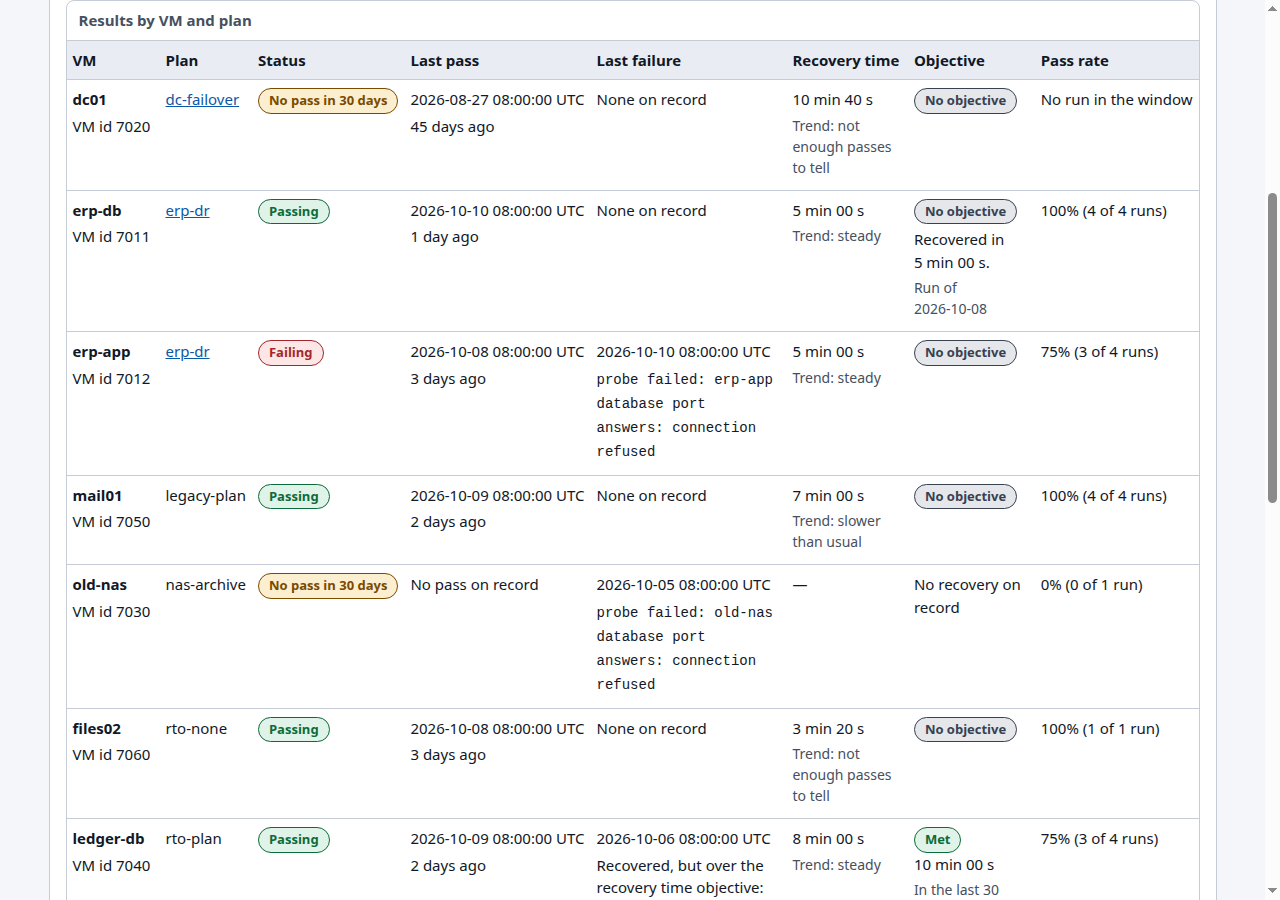
Results for every VM
Passing, failing, or no pass in 30 days. The last pass, the last failure and why, the recovery time against an objective, and the pass rate. A report counts only if its signature verifies.
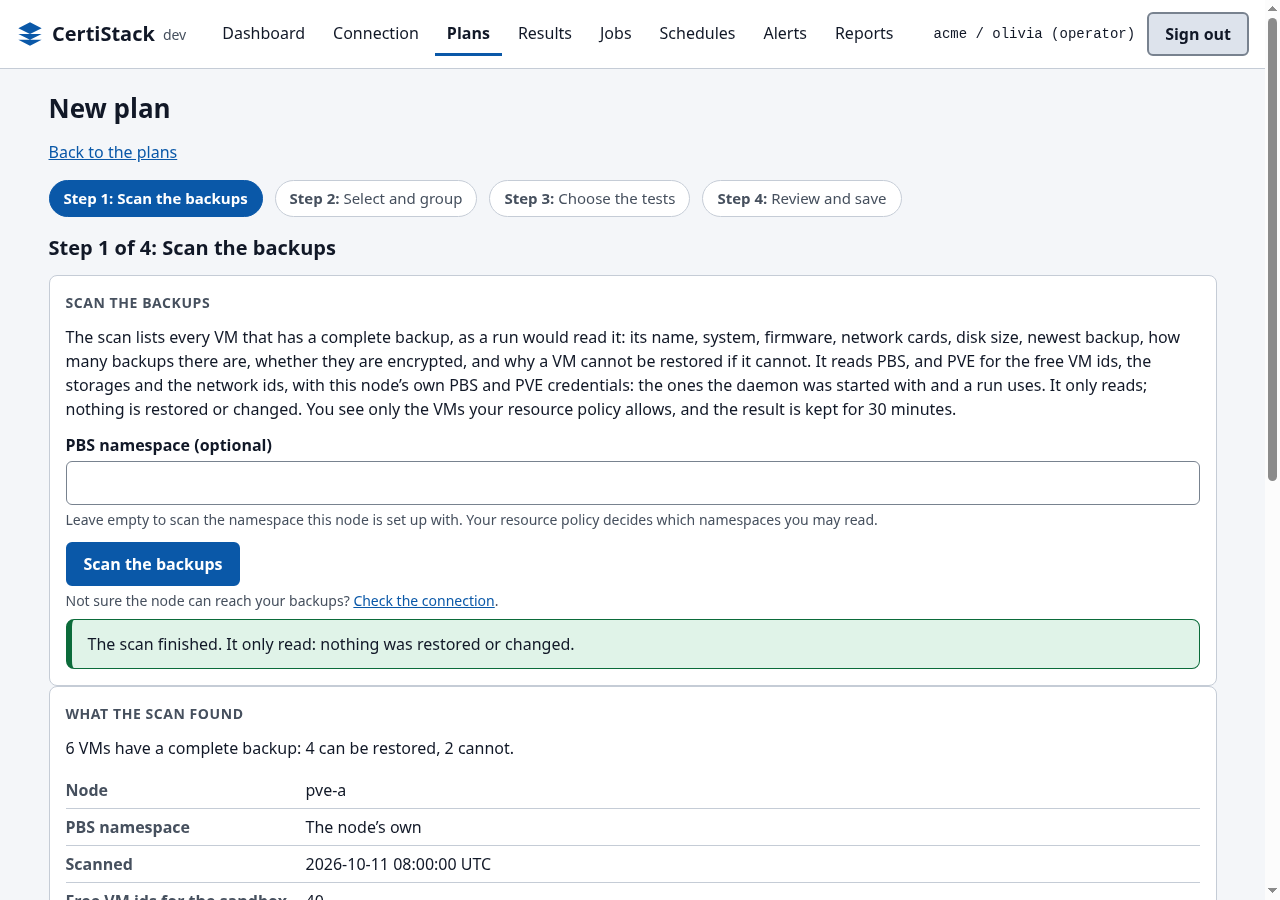
Plans without YAML
A read-only scan of the node's backups, then pick the VMs, group them, choose the tests, preview and save.
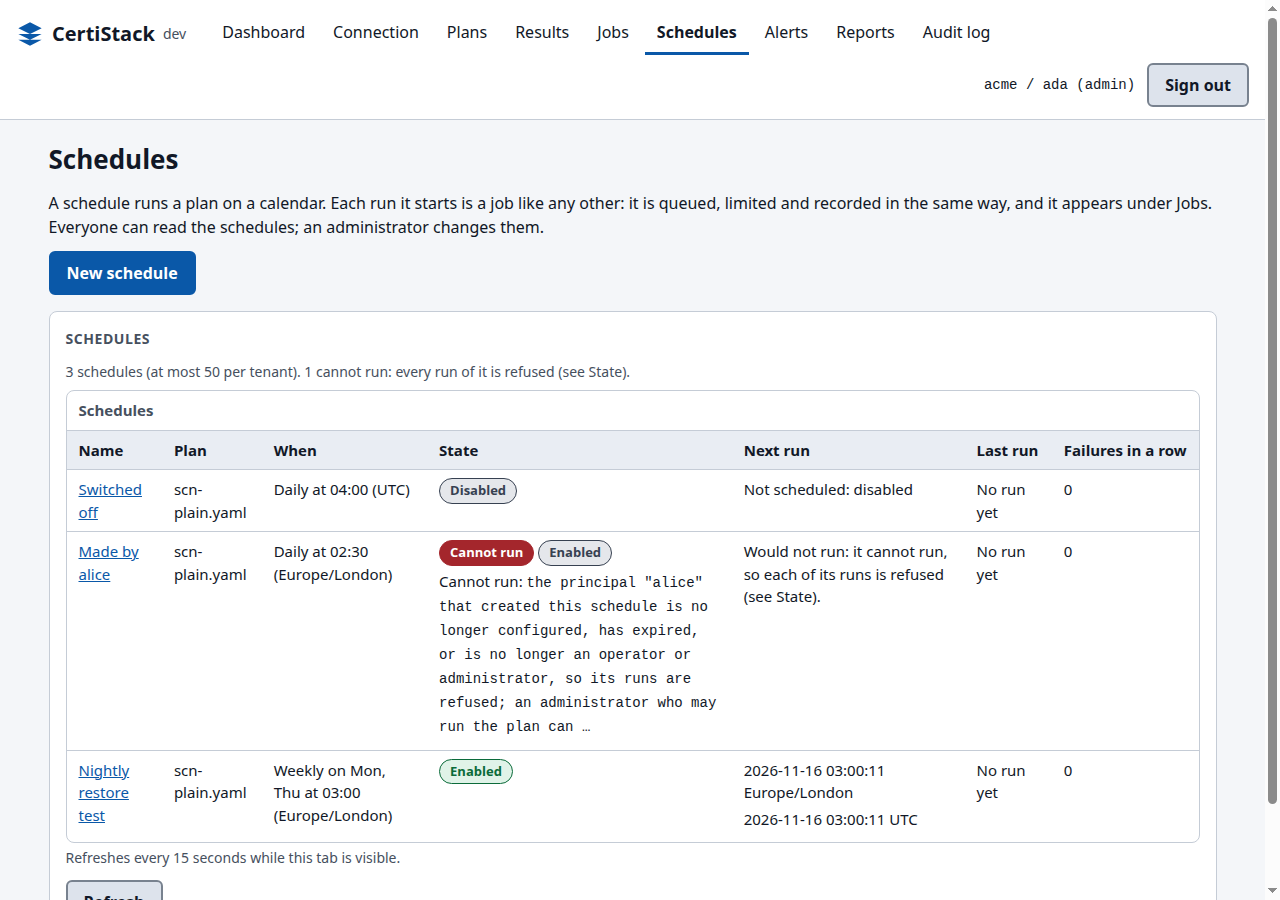
On a schedule
Daily, weekly, monthly or every few hours, in your time zone, with blackout windows and a rule for runs the node missed.
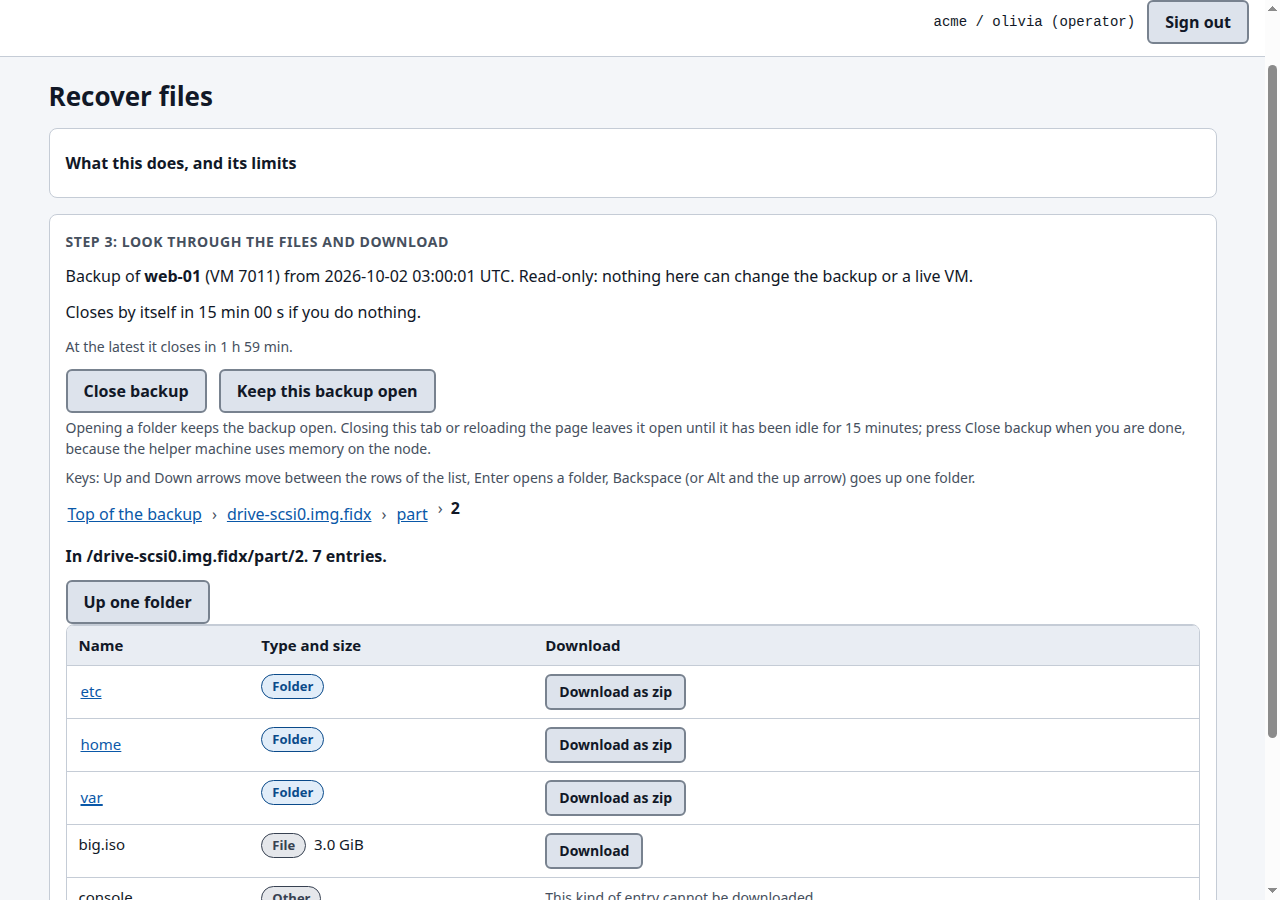
Self-service file recovery
A client opens its own backup read-only and downloads a file or a folder, with no Proxmox VE account. Every download is audited.
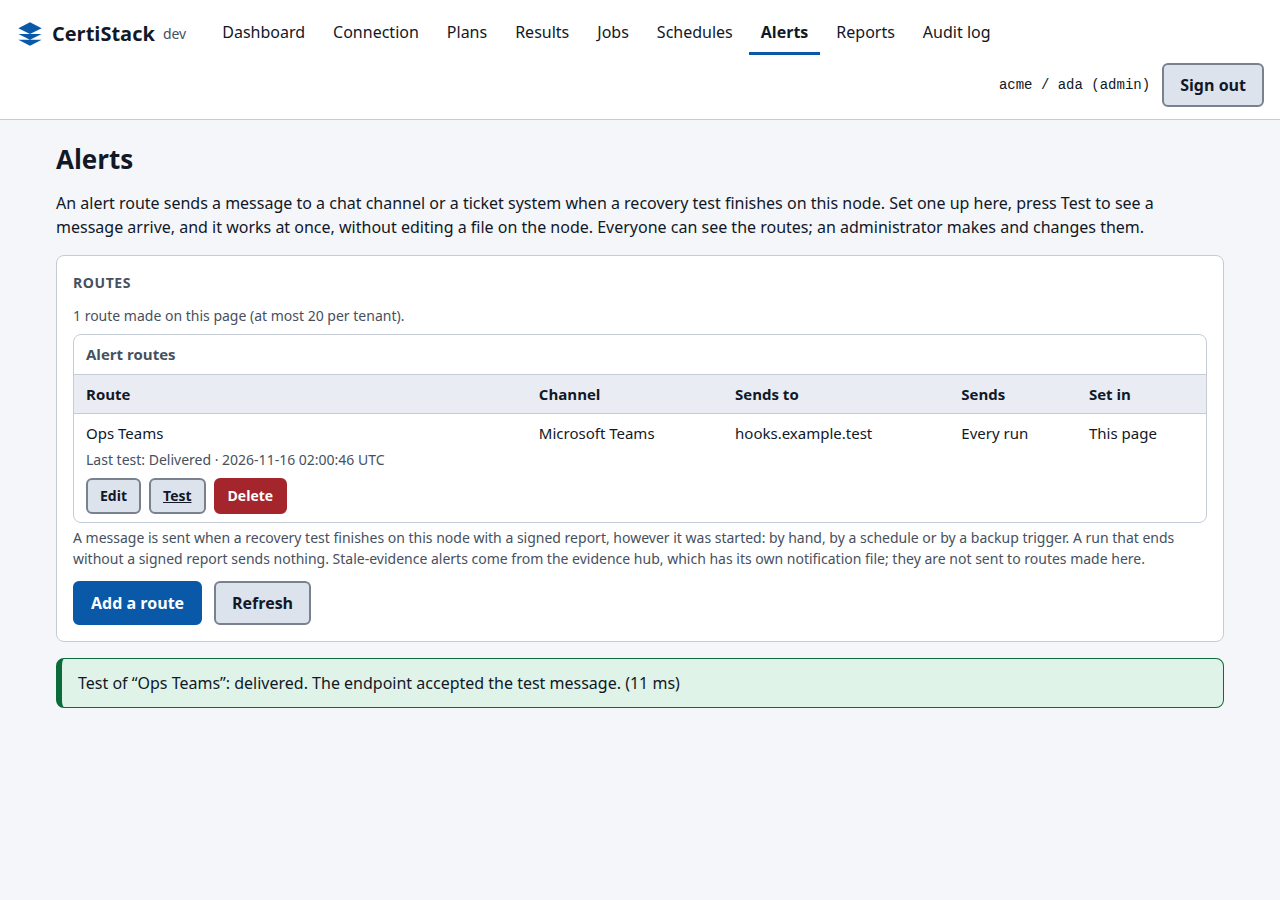
Alerts you can test
Slack, Teams, Discord, HaloPSA or a webhook when a test finishes or fails. Set up in a form, tested with one button.
- Evidence to hand over. HTML and PDF binders of a run, and evidence packs: a period's signed reports in one file, checkable with standard tools.
- Tenants, for MSPs. Each client has its own access tokens, roles, plans and reports; every action goes into a tamper-evident audit log.
- An HTTP API for everything the dashboard does.
The screenshots are the dashboard itself, with demo data; open one to see it full size. The Enterprise Edition is in early access: online checkout is not open yet. It works node by node; there is no central fleet controller yet.
Commercial licensing
Community Edition is free and open source: it runs the restore tests and writes an unsigned report of each run. Homelab+, Pro, Team, and MSP Fleet are the Enterprise Edition plans. The Enterprise Edition is in early access and online checkout is not open yet: each plan below asks for early access by e-mail, and we write back when it opens. The Enterprise Edition signs each report (signed attestations, with a key its certistackd service keeps in a root-only file on the node; anyone can check them with the open verifier) and adds the management daemon, dashboard, and HTTP API. The Enterprise daemon is installed on each Proxmox VE node it validates. Enterprise Scale is a negotiated agreement.
The prices are the planned prices for when checkout opens. They are in US dollars and exclude sales tax, which is added where it applies, based on your billing address. Homelab+ and Pro will be billed yearly; Team and MSP Fleet monthly or yearly. To ask for early access, write to sales@certistack.dev. Questions about licensing? Write to licensing. Changing plan: a higher-priced plan takes effect at once and is billed pro rata; a lower-priced plan or a shorter billing interval takes effect at your next renewal. The commercial license agreement will be published before checkout opens.
Community
Free and open source under the AGPL (version 3 or later), for any use that complies with the license, MSPs included.
- GNU Affero General Public License, version 3 or later (AGPL-3.0-or-later)
- No node or VM cap — commercial use permitted
- Full local CLI runner (
certistack run) - Read-only PBS mapping with COW overlays and temporary copies when needed
- Synthetic probes (TCP, HTTP/HTTPS, DNS, LDAP, SQL Server, SMB, guest agent)
- A canonical JSON report of each run with its cleanup record, unsigned; read it with
certistack report show - Open verifier:
certistack verify-report; with--unsigned --expect-outcome passit judges an unsigned report's contents, which are the run's own claim, not authenticated
Homelab+
The Enterprise management daemon and dashboard for a personal, non-commercial lab.
- Management daemon, dashboard, and HTTP API for one lab
- Signed attestations: each report is signed with an Ed25519 key kept in a root-only file on the node that runs the daemon
- Up to 25 protected workloads
- Personal and non-commercial use only; business use needs Pro or above
- Signed license file, issued by e-mail
Pro
Commercial licensing and printable evidence for one site.
- Up to 15 protected workloads at one site
- Management daemon, dashboard, and HTTP API
- Signed attestations: each report is signed with an Ed25519 key kept in a root-only file on the node that runs the daemon
- HTML and PDF binders rendered from the signed record, which carries the signature and key fingerprint
- Commercial license — no copyleft obligation
Team
Commercial licensing and the management plane for internal engineering teams.
- Up to 35 protected workloads
- Management daemon, dashboard, and HTTP API, with viewer and operator roles
- Signed attestations: each report is signed with an Ed25519 key kept in a root-only file on the node that runs the daemon
- Compliance binders and outbound webhooks
- Need more capacity? Contact sales
MSP Fleet
Tenant separation, a central evidence hub and a licence without copyleft, for managed service providers. Community under the AGPL also works for MSPs.
- Up to 75 pooled workloads across unlimited tenants
- Tenant separation for per-client reporting
- Management daemon, dashboard, API, and webhooks
- Signed attestations: each report is signed with an Ed25519 key kept in a root-only file on the node that runs the daemon
- One daemon per Proxmox VE node, plus a central evidence hub across nodes and clients
- Larger fleets priced by agreement
Enterprise Scale
For larger, multi-site, or constrained deployments that need more than MSP Fleet. Write to sales; the scope is agreed in writing.
- 250 protected workloads at the starting price; larger deployments by agreement
- Deployment, security, and capacity scope defined in writing
- Support commitments agreed per contract
- Security review and procurement handled directly